
PDF Files Explained: What a PDF Is and How It Works
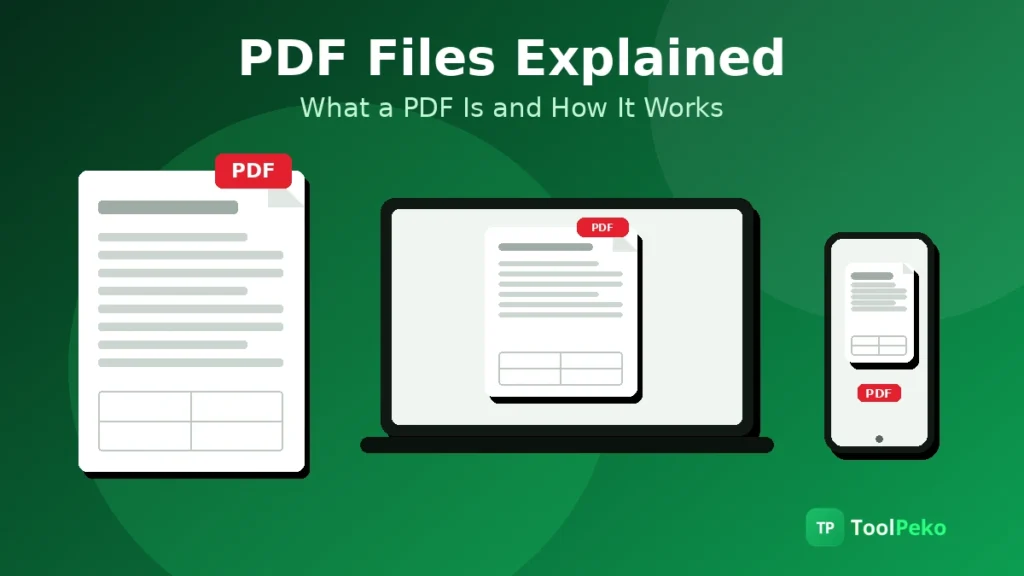
A PDF file carries everything it needs inside itself: the text, the fonts, the images and the exact position of every element on the page. That is why a PDF opens identically on a phone, a laptop and a printer, while a Word file can shift, reflow and swap fonts.
You know the failure PDF was built to kill. The file looked perfect on your screen. On the other screen, the fonts changed, the spacing wandered and a table slid halfway off the page.
So what is a PDF file, really? Not a picture of a page, though it can hold pictures.
Not a Word file with the editing switched off, though it often gets treated that way. A PDF is a page described so exactly that any device can rebuild it perfectly. Get that one idea and the rest of the format, its powers and its annoyances, falls into place.
What is a PDF file?
PDF stands for Portable Document Format. The portable part was the whole point in 1991. A document that travels between machines and arrives looking identical, no matter which program made it or opens it.
Think of it as the difference between handing someone a recipe and handing them the finished dish. A Word file is the recipe. The reader’s machine does the cooking, with whatever ingredients (fonts, settings, software versions) it happens to have in the kitchen.
A PDF is the dish, plated. Nothing is left to local interpretation.
And the format is not owned in the way most people assume. Adobe invented it, then handed control to the International Organization for Standardization in 2008. Since then PDF has been an open standard that anyone may use without paying royalties.
Where PDF came from: a short history that explains the present
The timeline is short, and every date explains something you still see today.
- 1991 – Adobe co-founder Dr John Warnock writes a paper for a project called Camelot. His complaint: documents changed appearance every time they moved to a different machine.
- 1993 – PDF 1.0 ships with Adobe Acrobat on 15 June, and the free reader is why it spread everywhere.
- 2001 to 2007 – Forms, digital signatures, passwords and multimedia arrive across versions 1.4 to 1.7. PDF grows from printed pages into paperwork.
- 2008 – Adobe hands the format to ISO. PDF 1.7 becomes ISO 32000-1:2008, maintained through the PDF Association and its standards committee.
- 2017 and 2020 – PDF 2.0 arrives as ISO 32000-2, the first version developed inside ISO itself, current edition ISO 32000-2:2020.
Notice what never changed across thirty years: the page stays fixed.
How does a PDF work? The fixed-page trick
Open a DOCX file and your software rebuilds the page on the spot. It takes the text, looks for the named fonts on your machine, measures everything and lays the page out fresh.
Different fonts installed? The layout moves. A different software version moves it again.
A PDF skips the rebuilding. When a PDF is created, the layout work happens once. The file stores the finished result: this character, at this exact position, in this size.
What travels is not instructions for building a page. What travels is the page itself, described down to fractions of a point.
Three ingredients make that work:
- A page description language inherited from PostScript, Adobe’s printing technology
- Fonts embedded inside the file, so the exact typeface travels with the document instead of being borrowed from the reader’s machine
- One structured file that bundles text, fonts, images and settings together, compressed small enough to email
Positions in a PDF are mathematical, not tied to any screen. The same page prints sharply on a press and renders cleanly on a phone.
But the trick has a price, and you have paid it. Fixed pages do not reflow. Text sized for A4 stays sized for A4, so reading a long PDF on a phone means pinch, zoom, drag, repeat.
That is not a bug in your reader. It is the guarantee, viewed from the other side.
What a PDF can hold inside
Most people meet the plain version: text and images on pages. The format carries far more than that.
- Vector drawings, the logos and diagrams that stay sharp at any size because they are stored as shapes, not pixels
- Photos and scans, stored as ordinary images inside the page
- Form fields, checkboxes and buttons, the reason official paperwork moved online
- Hyperlinks, bookmarks, comments and annotations
- Digital signatures that show whether a file changed after signing
- File attachments of almost any type, tucked inside the document like papers in an envelope
- Metadata, the quiet layer that records a title, an author and the software that made the file
That last one surprises people. A PDF can act as a container, not just a document. Worth remembering when a stranger’s file lands in your inbox.
The PDF family: PDF/A, PDF/X, PDF/E and PDF/UA
One format, a few strict rulebooks. A regular PDF follows the general rules.
The variants below each forbid and require specific things for one special job. An institution that asks for one by name is not being fussy. It is telling you which rulebook the file will be judged against.
| Variant | Standard | Built for | Use it when |
|---|---|---|---|
| PDF/A | ISO 19005 | Long-term archiving | A court, office or archive must open the file decades from now. Everything embedded, nothing external, no encryption |
| PDF/X | ISO 15930 | Professional printing | A print shop needs exact colour and fonts, with no surprises on press |
| PDF/E | ISO 24517 | Engineering | CAD drawings and 3D models must travel inside the document |
| PDF/UA | ISO 14289 | Accessibility | Screen readers and assistive tools must read the document properly, which takes a tagged PDF |
Of the four, PDF/A is the one a normal reader will ever be asked for, usually by a court, a university or an archive.
PDF vs Word vs a web page
Each format wins at a different job, and half the fights people have with files come from using the right format at the wrong stage.
| Question | Word (DOCX) | Web page (HTML) | |
|---|---|---|---|
| Looks identical everywhere | Yes, by design | No, fonts and versions shift it | Mostly, browsers differ slightly |
| Easy to edit | No, deliberately hard | Yes, that is its job | Only with access to the site |
| Fills and signs forms | Yes | Awkward | Yes, if built for it |
| Reads well on a phone | Poorly, fixed pages | Reflows, reads fine | Best, built to reflow |
| Prints exactly as designed | Yes | Varies by machine | Varies by browser |
The working rule is simple: write and edit in Word, publish on the web, and send or archive as PDF. And when a client sends a PDF and asks for changes inside it, you usually need the text back in an editable file. That is the job of a PDF to Word converter.
Why is my PDF file so large?
Almost never because of the text. A full page of typed words weighs a few kilobytes. When a PDF balloons, pictures did it.
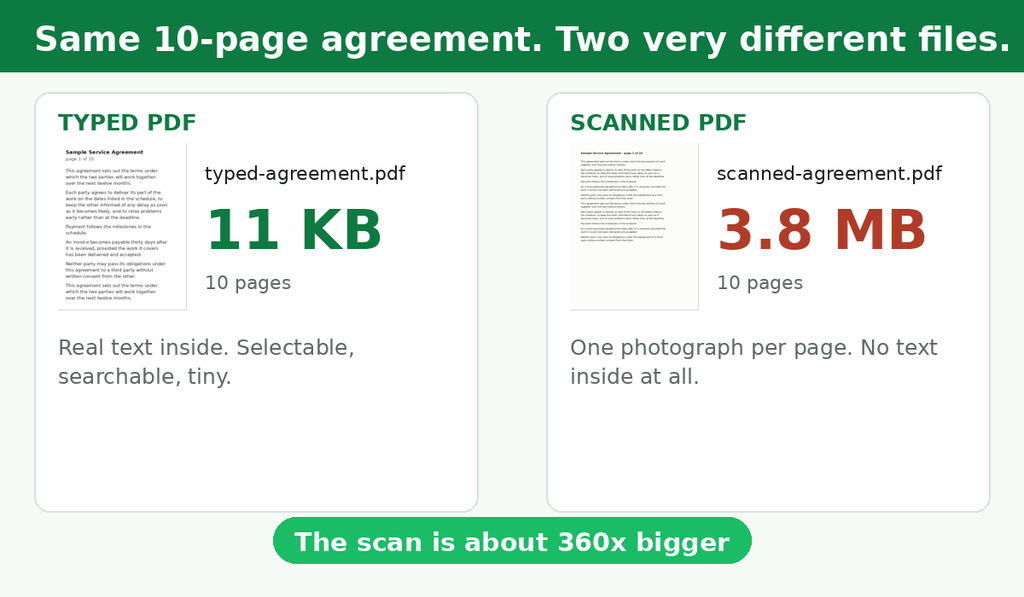
I built both versions of the same ten-page agreement before writing this, just to keep the numbers honest. Typed and saved as a text PDF, it came to 11 KB.
Scanned at 200 DPI, so each page became a photograph of itself, the same ten pages came to 3.8 MB. Same words. Roughly 360 times the size.
The usual causes, in the order they usually strike:
- Scanned pages, one full-page image per page, the heavyweight champion of file size
- Photos kept at full camera resolution when the page shows them small
- Whole fonts embedded when only a few letters of them appear (good files keep only the characters actually used)
- Attachments riding inside the file
- Leftovers from repeated editing, old versions of pages still packed in the bundle
Text, by the way, squeezes beautifully. PDF compresses text and line drawings with a lossless method (the same idea as a ZIP file), so nothing is lost. Images get re-encoded with a lossy method borrowed from JPEG, which trades a little quality for a lot of size.
A file is big when there is a lot of image and little text. The fix follows the cause: shrink the images, and the file follows. On ToolPeko, that fix is the Compress PDF tool, and it works on the images first for exactly this reason.
Why a PDF can look wrong or blurry
Wait. Didn’t we just say identical everywhere? We did, and the promise is real, but it holds only when the file was built right.
Three failures account for nearly every broken-looking PDF you will ever meet.
The font was never embedded. The creator’s machine had the font, so the file borrowed it instead of packing it. Your machine does not have it, so your reader substitutes a lookalike, and spacing and line breaks shift quietly.
Or the file is a scan: a photo of text, not text. Zoom in and it pixelates like any photo. There is nothing to select or copy, because no letters exist in the file, only a picture of letters.
Running OCR over it adds a hidden text layer under the picture, and only then does the file start behaving like a document. On ToolPeko, the Image to Text tool runs that OCR step in your browser.
The images were saved small. A picture stored at low resolution to keep a file tiny stays soft forever. On screen it passes.
On paper, or at 200 percent zoom, it falls apart. No reader setting can invent detail that was never saved.
Is a PDF safe? Passwords, encryption and the virus question
PDF has real security tools: encryption, digital signatures, redaction that burns sensitive text out of the file rather than covering it.
But one distinction matters far more than people admit, and most explainers skip it. A user password, the one demanded before the file opens, encrypts the document. An owner password, the one that blocks copying or printing, does not encrypt anything.
It is a polite request that software follows, and common tools can strip it in seconds. A file with an owner password is restricted. It is not secure.
When you genuinely need the first kind, set a user password with a tool like Protect PDF. It applies the strong encryption PDF 2.0 specifies (256-bit AES).
Can a PDF carry a virus? Honestly, yes. The format allows JavaScript, embedded attachments and links, and all three have been abused.
Context decides the risk. A file from a person you know, opened in an updated browser or reader, is routine.
An unexpected attachment in an email, asking you to enable extra content, is the case that deserves suspicion. The file format is not the villain or the hero here. The sender is the variable.
When not to use a PDF
A format this good at freezing pages gets used for jobs that need the opposite. Send something else when:
- Five people are still writing it. A shared document belongs in a shared editor, not in a PDF emailed back and forth with names like final_v7
- Someone needs the numbers back. Figures locked in a PDF table are painful to extract, so send the spreadsheet alongside
- It is going on the web. A PDF is a poor web page: heavy, fixed, awkward on phones
- The reader will read it on a phone, start to finish. Give them a format that reflows
- The document changes weekly. A living document frozen weekly is just an out-of-date document with good typography
None of this dents the format. It just keeps the freeze for the moment freezing is what you want: the final version, the signed copy, the record.
Opening, creating and doing the common jobs
Opening one costs nothing. Every browser reads PDFs, and free readers add form filling, signing and annotation. You do not need to buy Acrobat to read or make a PDF, and you have not needed to since 2008.
Creating one is just as plain. Print to PDF from any app, or Save as PDF from any office program, and the file is done.
The format is free. Only heavy editing software tends to cost money, because editing a frozen page is genuinely hard work for software.
Everyday jobs are short ones. Combine files with Merge PDF when ten attachments should be one document. Fix wording with Edit PDF when a small change is not worth rebuilding the file.
Shrink, convert, sign, protect: the rest of the bench is just as quick. Every one is free on ToolPeko and runs in your browser, so your file never leaves your machine.
FAQs
What does PDF stand for?
Portable Document Format. Portable was the promise: the document moves between machines and people without changing how it looks.
Is PDF free?
Yes. The format has been a free open standard since 2008, and readers and creation are free in any office app or browser. Advanced editing software is the part that usually charges.
What is a PDF/A?
The archiving variant of PDF, standardised as ISO 19005. It requires everything embedded and nothing dependent on outside resources, so the file can be opened and trusted decades from now.
Can PDF files contain viruses?
They can. A PDF may carry JavaScript, embedded files and links, and malicious senders have abused all three. Files from trusted senders in an updated reader are low risk, and unexpected email attachments are where caution belongs.
Why can I not copy text from a PDF?
Usually because the page is a scan: a photograph of text with no letters inside it to copy. OCR fixes that by reading the picture and adding a text layer. A smaller number of files block copying with an owner password instead.
How do I make a document a PDF?
Open it in the app that made it and choose Print, then Print to PDF, or use Save As and pick PDF. Every major office app and browser offers one of the two.
What is a PDF reader?
Any program that displays PDFs: your browser, the free Adobe Acrobat Reader, or the viewers built into Windows, macOS, Android and iOS. The better ones add forms, signatures and notes.
Will a PDF still open in 20 years?
Very likely, and that is by design. The specification is a published ISO standard, and readers are everywhere. The archiving variant PDF/A exists to remove the remaining risks, such as missing fonts or external content.
The page you send is the page they see
That was the promise in 1991, and it still sits underneath contracts, forms, manuals and court filings everywhere. Now you know what makes the promise hold, where it quietly breaks, and which jobs it was never meant for.
Conclusion
When a PDF job lands on your desk, the PDF tools at ToolPeko cover the whole bench for free, in your browser. The next two guides take those practical questions head-on: first compressing a PDF without losing quality, then merging files in the right order.
Tools from this guide
Free in your browser. No sign-up, nothing uploaded.

Arbaz Khan is an SEO specialist and content strategist, and the person behind ToolPeko. With 3+ years of experience in technical SEO and content, he built ToolPeko around a simple rule: free tools that run in your browser, and guides that show the job, name the limit and skip the sales talk. Every guide on this site ends at the tool that does the work.