
Image Formats Explained: JPG, PNG, WebP, GIF, SVG
What is an image format?
An image file format is the rulebook a file uses to store a picture, deciding what it keeps and what it throws away. JPG stores photos, PNG stores graphics needing transparency, WebP shrinks web photos, GIF loops tiny animations, and SVG stores logos as instructions, not pixels.
The trouble starts at the edges. The portal that rejects your WebP. The logo that looked sharp on your screen and tired on the client’s.
Then there is the photo that weighs 361 KB in one format and 2.5 MB in another, pixel for pixel the same picture.
One photo, five rulebooks, and the biggest copy came out about eight times the smallest in a test built for this guide. Nothing about the picture changed. The storage did.
Raster and vector: the split to learn before the formats
Every format in this guide is one of two animals.
A raster file stores a grid. Each cell is one pixel with one color, and the picture is millions of those decisions written down. Photographs are grids in real life too, light landing unevenly on everything.
Vector files take the opposite road, storing instructions instead. Draw a circle here, fill it green, put the letter T inside. Whatever opens the file does the drawing at that moment, at whatever size is asked.
A vector file has no pixels to run out of. Logos made this way never go fuzzy. Photographs made this way stop being photographs.
Hold that split. The first four formats here are raster, SVG is vector, and half of all format confusion is this one difference wearing a disguise.
The same photo in five formats: a real size test
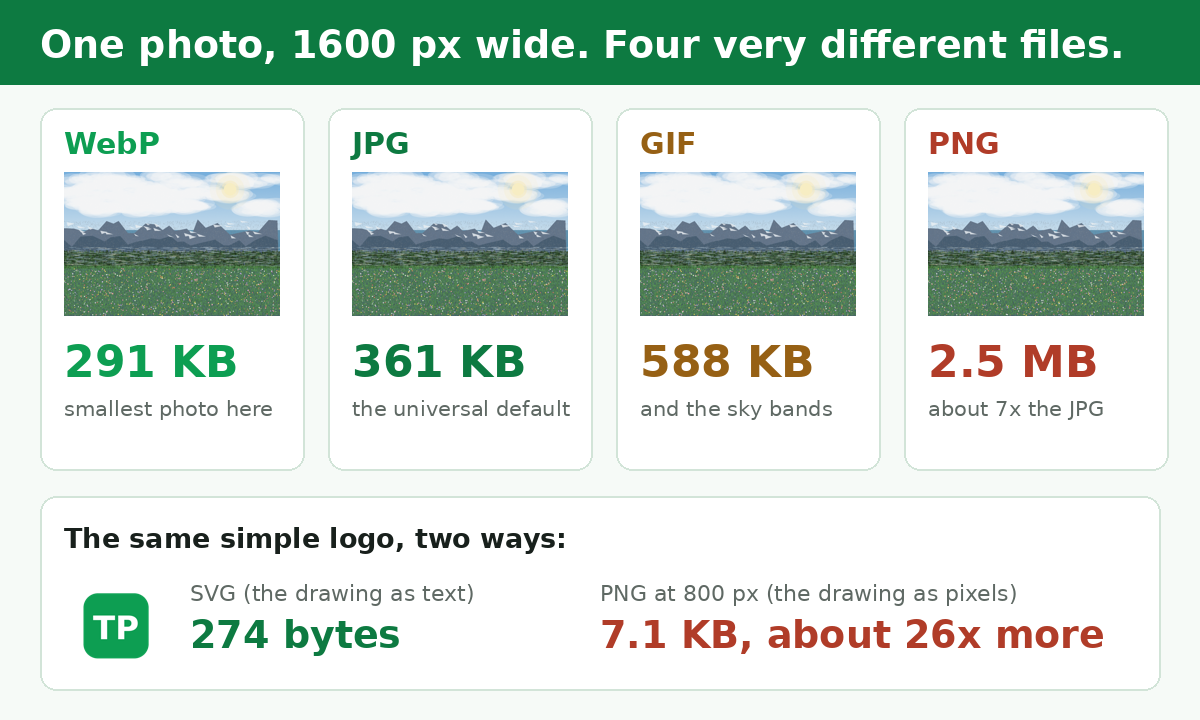
Claims are cheap, so this guide built its own evidence: one detailed test photograph, exported at exactly 1600 pixels wide in four formats.
| Same photo at 1600 px wide | File size | What you notice |
|---|---|---|
| WebP, quality 85 | 291 KB | Looks the same as the JPG at this size |
| JPG, quality 85 | 361 KB | The reference copy the others are judged against |
| GIF, 256 colors | 588 KB | The sky breaks into visible bands |
| PNG | 2.5 MB | Pixel for pixel exact, about seven times the JPG |
| Same logo as SVG | 274 bytes | Sharp at any size it is ever shown |
| Same logo as PNG, 800 px | 7.1 KB | Sharp only at the size it was saved |
One mechanism explains the whole table. A photograph is millions of near-unique pixels, each slightly different from its neighbour. A lossless format must keep every one faithfully, so PNG had almost nothing it was allowed to do except write them all down.
A lossy format plays a different game. It may merge lookalike pixels and delete differences your eye forgives. That permission is the entire reason JPG and WebP finish at a fraction of the weight.
Run the same test on your own photo with an Image Converter and the pattern repeats. When a file still beats a size limit, a Compress Image pass shrinks it.
JPG: the photo default, and the tax it charges
JPG arrived in 1992 from the Joint Photographic Experts Group and won the camera era outright. Every phone, camera and dusty office program can open one. JPG and JPEG are the same format, by the way, the longer name having lost an old fight with three-letter file endings.
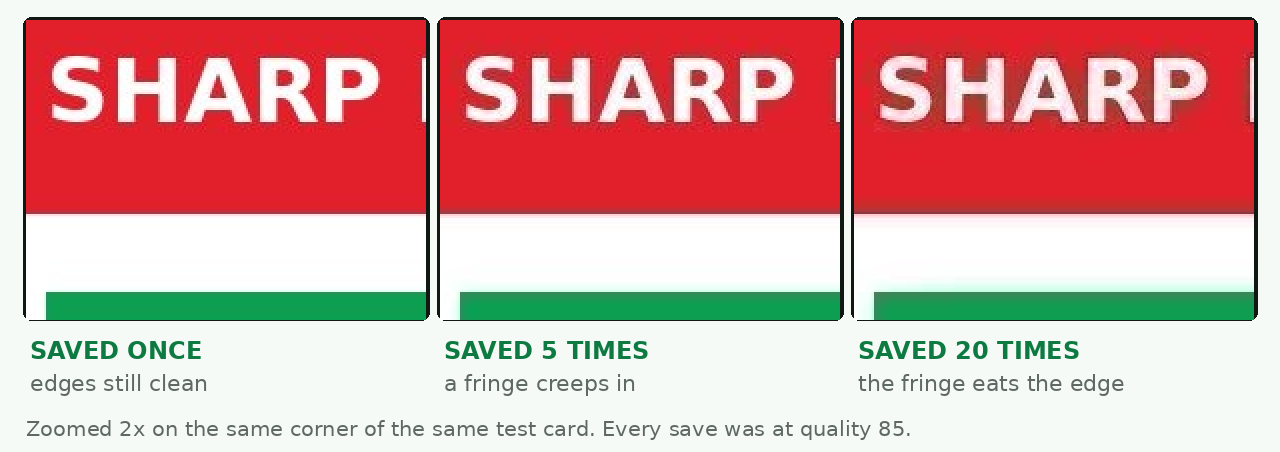
It compresses by merging close colors and dropping detail your eye is least likely to miss. On a photograph the trick is close to invisible. On sharp edges it is not, because an edge is exactly the sudden change JPG discards first.
Then there is the tax, charged on every save: each edit-and-save cycle compresses the whole image again from its current, already-damaged state. Across months of small edits, soft fringes grow around text and logos.
People feel this tax and reach for the wrong cure. They run the tired file through a JPG to PNG converter and wait for the sharpness to return.
It does not: the conversion changes the container, and sometimes you genuinely need that container. But the quality was deleted at the earlier saves, and no format can undelete it. The PNG is a perfect, heavy photograph of the damage.
No transparency, no animation, and one standing warning: never treat a JPG as the master copy of anything you love. Keep the original, edit copies.
PNG: lossless, transparent, and heavy
PNG was published in 1996 by the PNG Development Group as a W3C recommendation, the patent-free successor to GIF. Its promise is simple: what goes in comes out, pixel for pixel, nothing lost.
For graphics, that promise is gold. Screenshots stay crisp, text stays readable, flat colors stay flat. PNG also carries full alpha transparency, so soft shadows and cut-out edges blend into whatever sits behind them.
That one ability is why PNG owns logos, interface graphics and anything cut out from its background.
For photographs, the same promise becomes the bill from the size test. A photo gives lossless compression almost nothing to reuse, so a PNG photograph typically lands between two and ten times its JPG weight. Ours landed at about seven.
When a photo needs to travel light, converting it with a PNG to JPG tool is usually the whole fix.
One honesty point, because sources argue about it: plain PNG does not animate. An extension called APNG does, and some browsers play it.
WebP: the web’s smaller photo, and where it still fails
Google released WebP in 2010. It does lossy and lossless compression in one format, carries alpha transparency, and can animate. Google’s own measurements put lossy WebP about 25 to 35 percent smaller than a matched JPG.
Our test photo came in 19 percent under its JPG, not 30, because a grainy picture leaves less for any format to forgive. On smoother photos the gap widens toward Google’s range.
Lossless WebP also runs about 26 percent smaller than PNG, by the same source. And a JPG to WebP conversion is now the standard first move for a heavy web page.
Browsers are nearly all in, at about 96 percent worldwide. The MDN image formats reference tracks the per-format fine print.
Off the web, though, the ground gets rough:
- Government portals, exam forms and older upload systems still reject WebP outright
- Some email clients and office documents render it badly, or not at all
- Print shops will ask you to send something else
- Older photo viewers often cannot open one at all
For a page on your own website, WebP is the default now. For a file sent into someone else’s system, JPG is still the safe pair of hands.
GIF: 256 colors pretending to be video
GIF is the grandfather here, released by CompuServe in 1987. Its compression method, LZW, is lossless inside each frame.
The catch sits one step earlier. Before storing, every frame is squeezed into at most 256 colors. Photographs own millions, and that squeeze is where a GIF photo loses its smooth skies, as the bands in our test photo show.
What GIF has is animation, plus a crude transparency where one color can be fully clear.
But look at the arithmetic: a video format stores one full frame, then records only what changed in the next one.
GIF stores every frame almost whole, because it has no inter-frame compression at all. A few seconds of GIF can outweigh a full video clip of the same scene. One measured comparison put the same clip at 3.7 MB as a GIF against 551 KB as an MP4.
Keep GIF for tiny reaction loops and the one animation that survives an email inbox. Anything longer wants to be a video file.
SVG: drawings made of instructions, not pixels
SVG became a W3C standard in 2001. It is the odd one out: a text file that describes drawings as code, in a format called XML. Whatever opens it does the drawing on the spot.
That is why our test logo weighs 274 bytes as an SVG against 7.1 KB as an 800-pixel PNG, about 26 times lighter.
The gap also grows with size. Show the PNG at twice its saved size and it softens. Show the SVG on a billboard and the edges stay knife-clean, because the instructions simply get drawn bigger.
Logos, icons, diagrams and charts live here, transparency built in, shapes able to move under CSS control.
One myth needs a clean burial. You can wrap a photograph inside an SVG file, and some tools offer it as if it were a conversion. The photo inside stays a heavy raster photo in a vector coat, and nothing about it shrinks, sharpens or gains resolution independence.
AVIF: the newer one, in brief
AVIF arrived in 2019 from the Alliance for Open Media, built on the AV1 video codec. MDN puts it at roughly 50 percent smaller than JPG at matched quality, with transparency, animation and color depth reaching into HDR.
Browser support sits at about 95 percent.
The honest limits are creation and age. AVIF files are slow to encode, there is no progressive rendering, and plenty of everyday tools still cannot open one. Worth using on your own site if your tools support it, and not yet the file you email a stranger.
Why your logo goes blurry: three different diseases
Blurry logo complaints arrive as one problem and are actually three. Each has a different cause, a different cure, and a symptom you can match in seconds:
- The stretch: the file is small and something enlarged it, so the whole mark looks soft. Cure: a bigger source, or a vector original.
- The JPG fringe: the logo is a JPG, and its damage hugs sharp edges while photos nearby look fine. Cure: re-export from the original as PNG or SVG.
- The retina shortfall: modern screens pack two physical pixels into every layout pixel, so a logo saved at display size runs at half resolution. Cure: export at double size.
Match the symptom before reaching for a fix. Half the logos re-sent in a panic only ever had one of these. It was usually the third.
Screen vs print: the split nobody explains
Screens and print shops do not speak the same language, and formats get blamed for the translation errors.
A screen shows RGB light and counts in pixels. A print shop mixes CMYK ink and counts in physical size, asking for about 300 dots per inch at the printed size. A file can be enormous in pixels and still too small for a poster.
PNG is an RGB-only format, so a shop needing CMYK converts it their way, not yours. WebP is a web citizen and most shops simply refuse it. The safe handover is boring and reliable:
- Send the original at full size, not a copy that passed through a social app, which resized and re-saved it
- High-quality JPG is what most shops ask for, with TIFF as the old professional default
- If the shop names a format, that name wins over every rule in this guide
And the question print shops hear weekly: no, the logo from your website header is not big enough for the banner. That is the stretch again, wearing a larger hat.
Choosing in ten seconds
Strip away the history and the decision fits in one breath:
Photo for your own website: WebP, with JPG as the fallback every device understands. Photo to send or store: JPG. Graphic or screenshot needing transparency: PNG.
Logo or icon: SVG first, PNG when SVG is refused. Tiny loop: GIF, kept short. Print: the original, in whatever format the shop names.
| Format | Born | Type | Compression | Transparency | Animation | Best job | Avoid for |
|---|---|---|---|---|---|---|---|
| JPG | 1992 | Raster | Lossy | No | No | Photographs, anywhere | Logos, text, sharp edges |
| PNG | 1996 | Raster | Lossless | Yes, full alpha | No | Graphics, screenshots, transparency | Large photographs |
| WebP | 2010 | Raster | Lossy and lossless | Yes | Yes | Photos and graphics on websites | Sending files off the web, print |
| GIF | 1987 | Raster | Palette limited | One color only | Yes | Tiny loops, memes, email animation | Photos, long clips |
| SVG | 2001 | Vector | Not applicable | Yes | Yes, via CSS | Logos, icons, diagrams | Photographs |
| AVIF | 2019 | Raster | Lossy and lossless | Yes | Yes | Web photos where supported | Slow creation, older tools |
FAQs
What is the difference between JPG and PNG?
JPG deletes detail your eye forgives, so photos stay small and graphics suffer. PNG keeps every pixel exactly, so graphics stay crisp and photos get heavy.
Why is a PNG bigger than a JPG of the same photo?
Because lossless compression must keep every one of a photo’s millions of near-unique pixels. In our test the PNG came out about seven times the JPG.
Does converting a JPG to PNG improve its quality?
No. JPG deleted that detail when it saved, and no conversion brings deleted data back. The PNG is a faithful, heavier copy of the damaged picture.
What is a WebP file and should I use it?
WebP is Google’s 2010 web format, storing photos about 25 to 35 percent smaller than JPG in Google’s measurements. Use it on your website, send JPG off it.
When is WebP a bad choice?
When the destination is not a browser. Upload portals, exam forms, some email clients, office documents and print shops still reject or mishandle it.
Why is my GIF file so big?
A GIF stores every frame almost whole, with no inter-frame compression. A few seconds of movement can outweigh a full video clip of the same scene.
What is an SVG file used for?
Logos, icons, diagrams and charts. An SVG stores the drawing as instructions, so it renders sharp at any size and often weighs a few hundred bytes.
Can an SVG hold a photograph?
Technically yes, wrapped inside the file as a raster image. The photo gains nothing and loses the one advantage SVG exists for.
Why does my logo look blurry?
One of three causes: it was stretched, it is a JPG whose damage hugs edges, or a retina screen shows it at half resolution.
Which image formats support transparency?
PNG with full soft alpha, WebP and AVIF the same, SVG by design, GIF in a crude one-color form. JPG is the only common format with none.
Are JPG and JPEG the same thing?
Yes, one format with two names. JPG survived because old file systems allowed only three-letter extensions.
Which image format is best for printing?
Whichever your print shop names, usually a high-quality JPG or TIFF, sent as the full-size original.
Conclusion
Pick the format by the job, not by your software’s habit. And keep the untouched original of anything that matters, because an original makes every wrong pick reversible.
When the job means switching a file to another rulebook, the full set of converters sits in one place: the Image Converters category.
Tools from this guide
Free in your browser. No sign-up, nothing uploaded.

Arbaz Khan is an SEO specialist and content strategist, and the person behind ToolPeko. With 3+ years of experience in technical SEO and content, he built ToolPeko around a simple rule: free tools that run in your browser, and guides that show the job, name the limit and skip the sales talk. Every guide on this site ends at the tool that does the work.